
Squarespace vs Artlogic for Art Galleries (2026): Pricing, Features & My Experience

Artlogic is the industry standard all-in-one platform many art galleries rely on, to manage their website, inventory, selling art work in one system. Its database-driven system keeps artist portfolios, client relationship and availabe works perfectly synced, ideal for established art galleries handling high volume sales.
But for new or smaller art galleries looking to set up their first website and/or online store, Artlogic’s£53/$70 per month* vs Squarespace’s £12/$23 per month*, the starting cost can be a non-starter. Many simply need an affordable, beautiful website to showcase exhibitions, without enterprise-level tools.
As a Squarespace designer specialising in art galleries, I have helped gallery clients build beautiful, functional websites when Artlogic’s cost or complexity doesn’t suit their needs:
✅ More design freedom (no template limitations)
✅ Lower costs (from £12/$23 month)
✅ Faster setup (launch in weeks, not months)
So, can Squarespace truly compete? Below, I compare pricing, features, and real-world use cases to help you decide.
*pricing as of June 2026

Squarespace vs Artlogic: Website for Art Galleries
Key Differences between Squarespace and Artlogic
To help you I’ve summarised the key differences between choosing Squarespace and Artlogic for an art gallery website. Bear in mind that Artlogic is a Content Management System (CMS) so everything you do is via the database with a user interface. Whereas Squarespace is primarily a website editor, so it excels at giving you the tools to easily build a website.
Feature |
Squarespace |
Artlogic |
Pricing |
Starts at £12/$16 per month |
Starts at £53/$70 per month |
Ease of Use & Set up |
Easy to set up for a quick launch |
Powerful CMS with steep learning curve |
Customisation & Design |
Drag and drop website editor with many styling controls, with CSS customisation available from the cheapest price plan |
Limited customisation, with CSS only available at the highest price plan |
Website Templates |
Over 100 free professional templates, but none designed specifically for art galleries |
Only 6 templates to choose from, but all designed specifically for art galleries |
Features for Art Galleries |
Porfolio showcase, eCommerce, blogging, events |
Built-in inventory management, CMS, online store, artist database |
Bespoke Website Design |
Not limited to certain design studios. Many talented Squarespace Designers can create Squarespace websites |
Bespoke websites can only be created by Artlogic's Design Studio |
Table comparing the features between Squarespace and Artlogic platforms.
#1 Pricing
Artlogic’s plan starts at a higher price point because the cheapest plan comes with a website and an online store. Whereas you can start with just a website at Squarespace. However, with the like-for-like plan, Artlogic is still higher at £53/$70 per month, when Squarespace is at £17/$23 per month.
Verdict: If you only need a website to start with, Squarespace’s Personal Plan at £12/$16 per month is an amazing offer. Artlogic doesn’t offer a website-only plan; the cheapest plan would be the Essential Website + Online Sales at £53/$70 per month.
PRO TIP
Get 20% off your first year’s subscription PLUS an extended free 6-month trial (instead of the standard 14-day) on your Squarespace website.
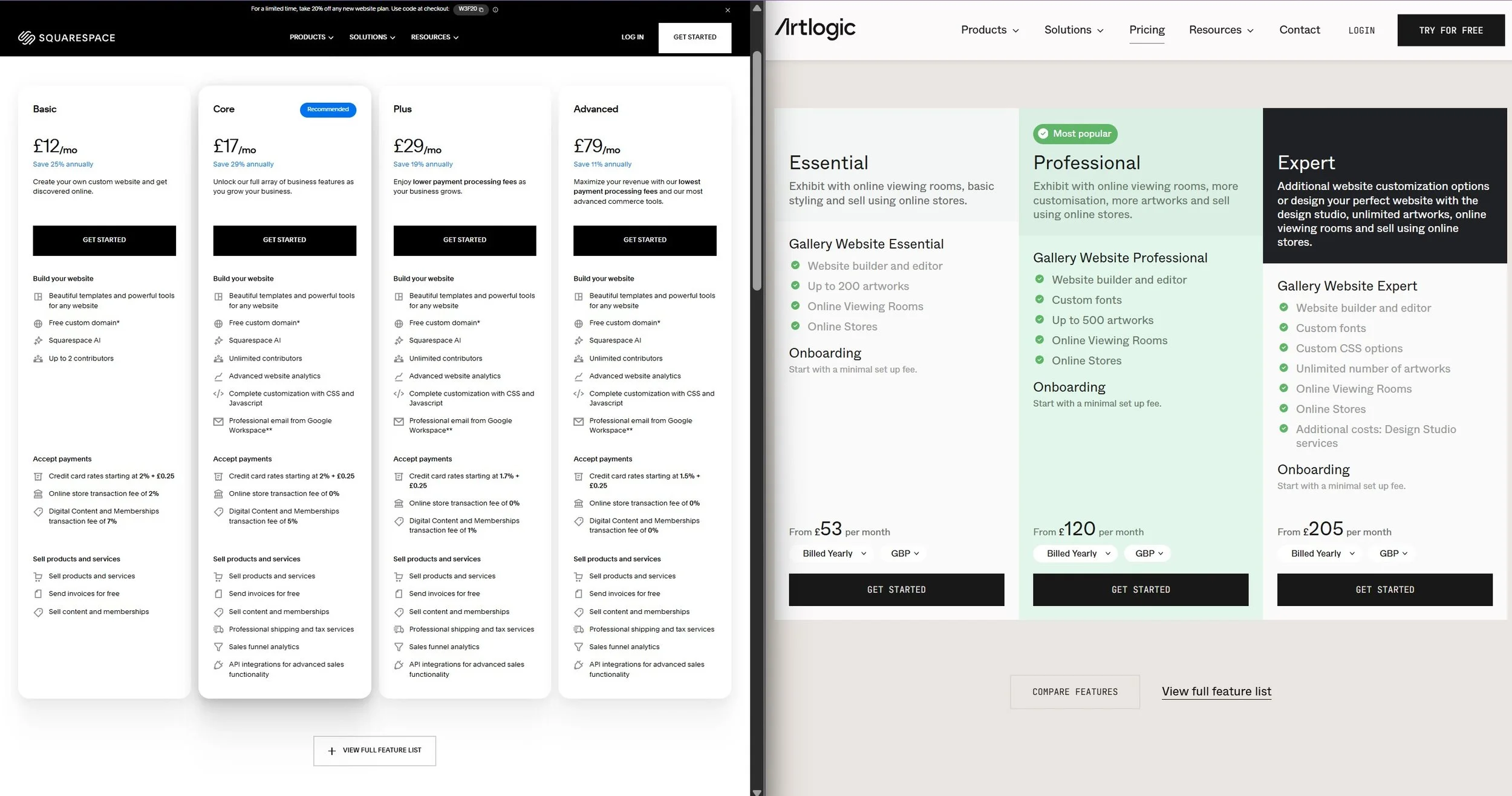
Pricing plan comparison: Squarespace on the left, Artlogic on the right.
#2 Setup & Ease of Use
Squarespace is primarily a website editor, allowing you to design and upload your content as you go. Squarespace’s platform simplifies the building and creation process.
Artlogic is driven by a database system, so to create a page, you input information in pre-defined fields in the backend and you can decide if that information is pushed to the website or not.
Verdict: For a new or small art gallery, Artlogic can be too complex for the job. Artlogic has a bigger learning curve. Its use is similar to using WordPress, whereas Squarespace is similar to using a PowerPoint.
PRO TIP
Before committing to Artlogic, build a sample exhibition page using Squarespace’s free trial. Most gallery owners can create a professional exhibition page in under an hour. This is often enough to see whether you really need a database-driven system.
Want an extended free trial (6 months vs 14 days)?
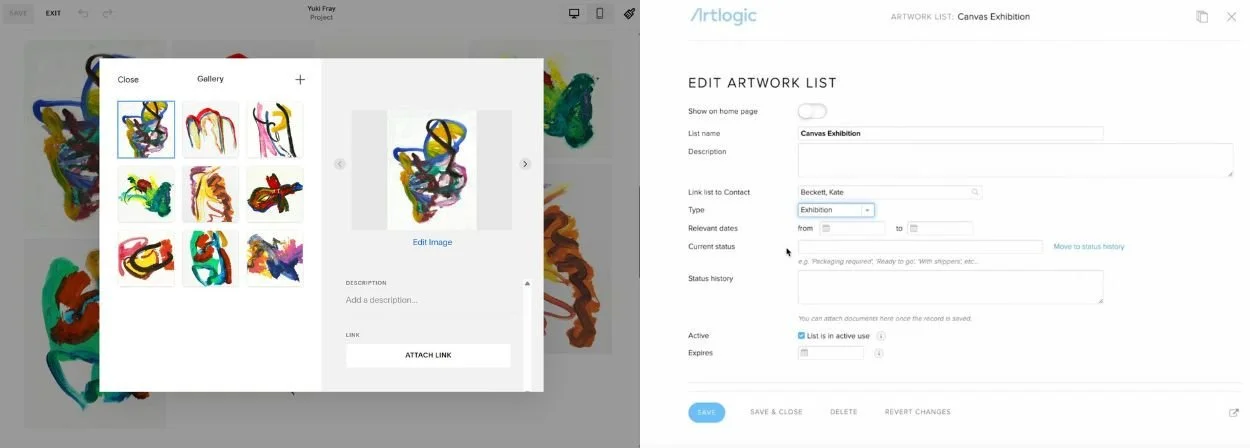
Editing artwork comparison: Left is Squarespace editing an image gallery section, right is Artlogic editing the artwork list.
#3 Customisation & Design
With Squarespace being primarily a website editor, everything from styling controls to its drag-and-drop Fluid Engine, it is designed for making web design easy. CSS being available at the cheapest pricing plan is a bonus.
Artlogic is primarily a CMS, and its database is powerful in managing content, including inventory, artists, and artwork. However, the ability to customise your website is limited to some basic styling, and Custom CSS is only available at the highest pricing plan. If you need a bespoke website design, it can only be done via Artlogic’s Design Studio (I’ve heard prices around $10k-20k).
Verdict: If the appearance of your website is a priority, Squarespace is the clear winner. Its visual editor, styling controls, and support for custom CSS make it possible to create almost any design without being locked into a gallery-specific template. Artlogic's customisation options are more limited unless you invest in a bespoke website from their Design Studio.
PRO TIP
Don't choose a template based on colours, fonts, or images. Those can all be changed. Instead, choose a template whose page layouts and navigation structure are closest to what you want.
-> Browse the professionally designed websites from Squarespace’s Template Library.
* a blank template is recommended only if you are a designer
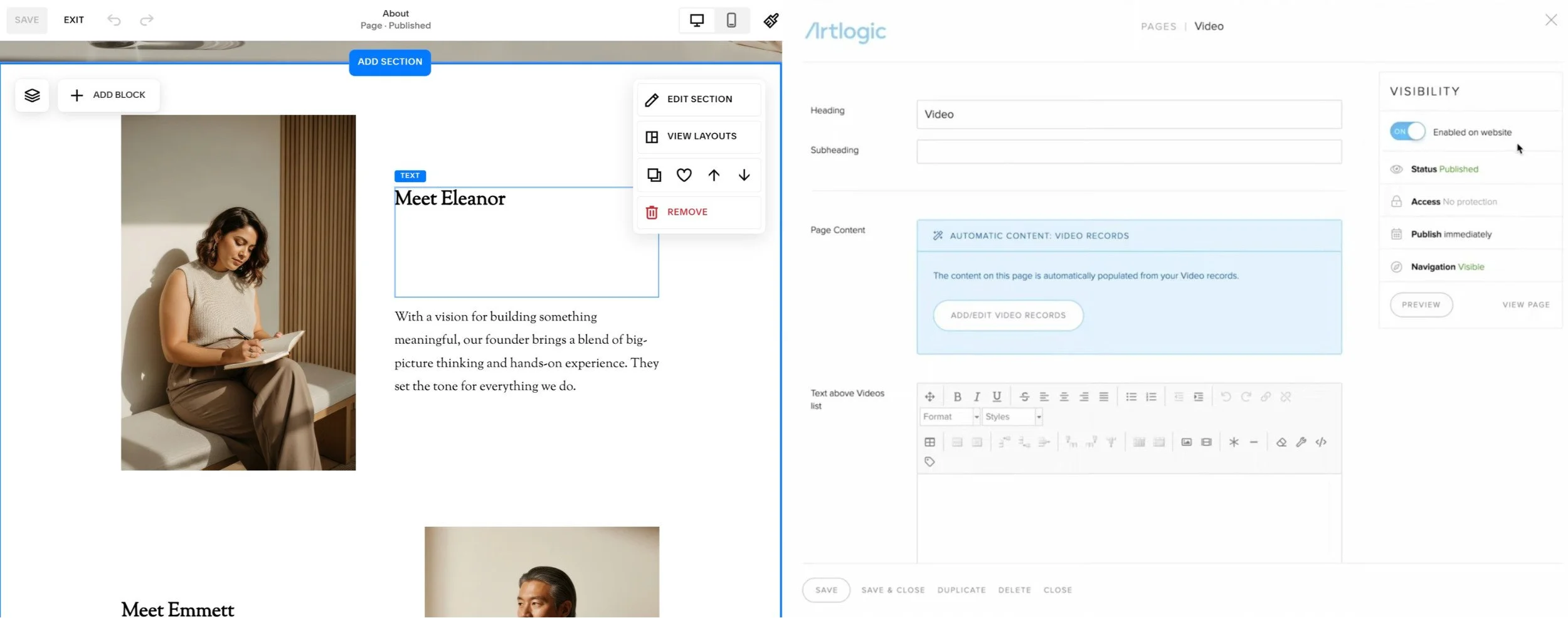
Editing a page comparison: Left is Squarespace editing each element on the web page, right is Artlogic editing a page via fields in the CMS.
#4 Website Templates for Art Galleries
Squarespace has over 100 templates to choose from, all professionally designed and free, but none are designed for an art gallery. To start a website with Squarespace, you choose a template, start a free trial, and off you go!
Artlogic has exactly 6 themes to choose from, but all designed specifically for art galleries. To start a website with Artlogic or to try it out, you need to contact them.
Verdict: Artlogic is the clear winner here. Squarespace doesn’t have ANY dedicated website templates for art galleries. The downside is that because there are only six themes available, many Artlogic gallery websites end up looking quite similar.
PRO TIP
Don't get too hung up on finding the perfect Squarespace template. The quality of your artwork, photography, and page layouts will have a much bigger impact on the final website than the starting template itself.
Looking for a gallery-specific starting point? I've created a Squarespace Art Gallery Template.
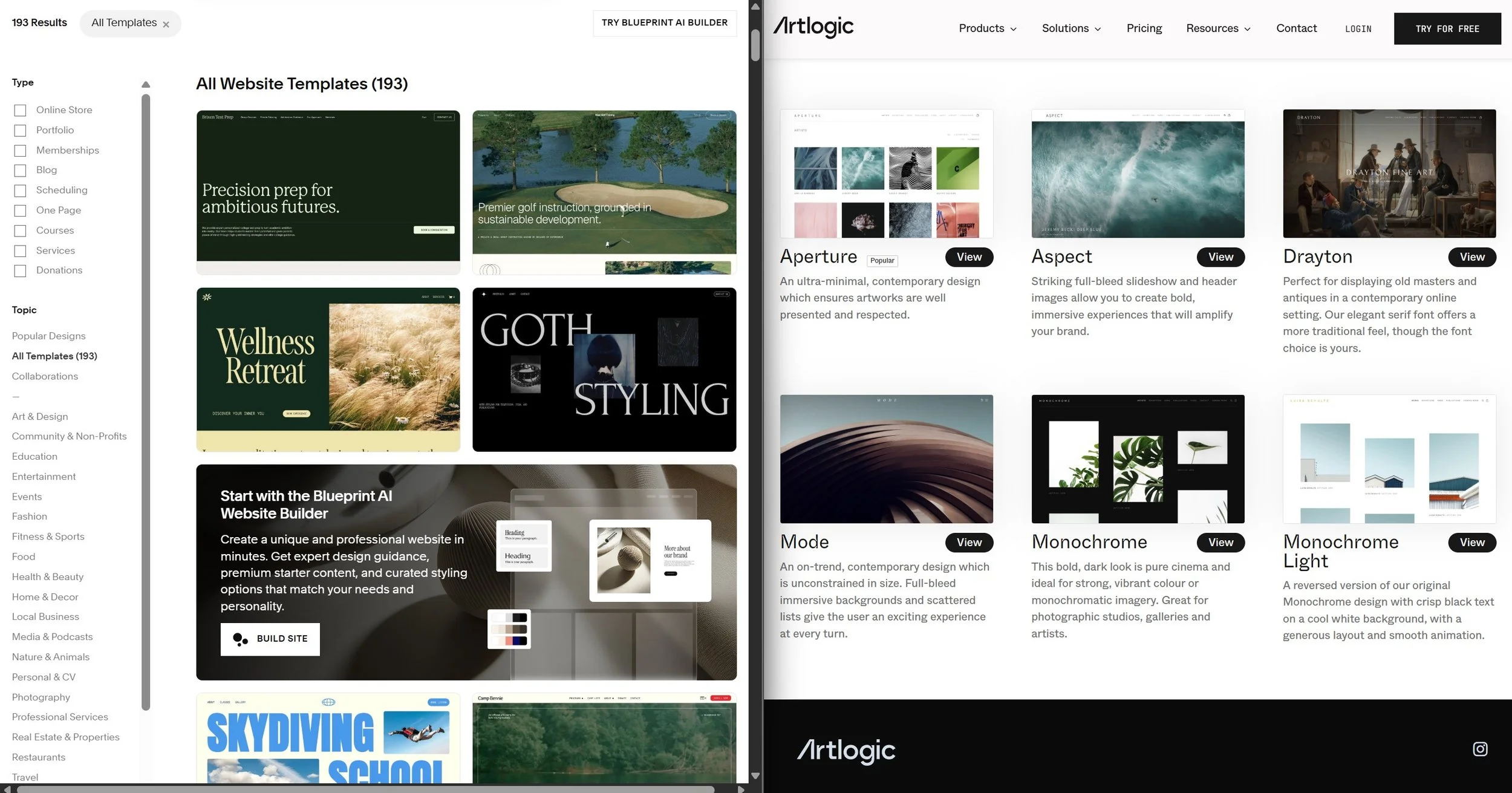
Templates comparison: Left is Squarespace with 193 templated designs, right is Artlogic with 6 themes.
#5 Features for Art Galleries
Both platforms have built-in features for setting up pages for exhibitions, artists, news, shops etc.
Artlogic's biggest advantage is that its website, inventory management, CRM, and artwork database are all connected. A gallery can update an artwork once and have that information reflected throughout the system.
Squarespace takes a simpler approach. While it includes features for exhibitions, artist pages, blogs, events, and ecommerce, inventory management is not its core strength.
Squarespace lacks, in comparison to Artlogic, is their image gallery and lightbox styling. There are different options for showing the image title/description in a gallery, but none are “perfect”. Fortunately, Beyondspace has a plugin called Lightbox Studio that more than makes up for it.
The most notable feature that Artlogic has is the “Enquire” feature on an image. This allows a potential buyer to send an enquiry about a particular piece of artwork. Squarespace doesn’t have that feature. That said, I’ve not had a client or potential client who wanted or needed that feature.
Verdict: If inventory management and artwork enquiries are central to your gallery's workflow, Artlogic has a clear advantage. If your primary goal is presenting artists and exhibitions through a beautiful website, Squarespace offers everything most small galleries need.
PRO TIP
Get Beyondspace’s Lightbox Studio plugin to level up your Squarespace image gallery.
-> Preview Lightbox Studio on your Squarespace website!
-> See how I’ve used it on an artist’s website.
#6 Bespoke Website Design
Squarespace has a large ecosystem of independent designers and developers who specialise in creating custom websites. This means galleries can choose from a wide range of designers with different styles, budgets, and levels of experience.
Artlogic also offers bespoke website design through its Design Studio. However, unlike Squarespace, galleries cannot hire an independent Artlogic designer. If you want a fully custom Artlogic website, you must work directly with Artlogic's team.
For galleries looking for a unique website design, Squarespace provides significantly more flexibility in both design choice and budget.
Verdict: Squarespace wins here. Galleries can choose from hundreds of specialist Squarespace designers at a range of price points, whereas Artlogic's bespoke design option is limited to its own Design Studio, which is often too pricy for smaller art galleries.
PRO TIP
If you decide to hire a Squarespace designer, browsing a directory can give you a good start to compare portfolios, pricing, and specialisms in one place.
-> Squarespace’s Marketplace, or

Designed for galleries, editable by galleries
When art galleries started asking me to build them Squarespace websites, I KNEW there should be an easier way; and thus the Studio Fresco Squarespace template was born.
Did I help? You can support me by sharing my post or consider ☕buying me a coffee☕ :) Thank you, happy building.
#neverstoplearning
Still undecided?
Book a free call and let me walk you through it.

