
5 Reasons Your Squarespace Website is not Showing Up on Google (2026)
The Problem
You’ve finally launched your Squarespace website. Excited, you go to Google to search for your website, but it is not showing up in the results. Why is that?
I have put together a list of the most common problems that I have experienced or helped clients fixed. Tried and tested!

Searching for your website on Google but nothing is showing up
Why is your Squarespace website not showing up on Google?
Here are some common reasons to why your Squarespace website might not be showing on Google. Starting from website admin to content planning.
#1 - Your Website is Password Protected (lock screen / coming soon page):
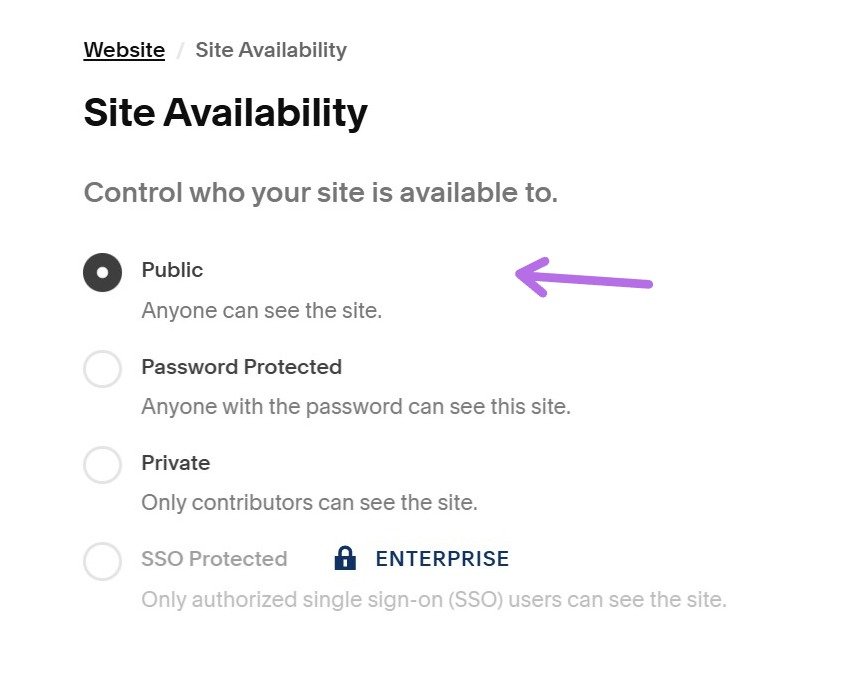
For a brand new website, if you have a lock screen (or called “Password Protected” in Squarespace), Google cannot access or read the content from your website; even if your pages are built and ready.
Using a “coming soon” page when building your website is perfectly acceptable. But if your site remains password protected after launch, Google will completely blocked from crawling and indexing it.
In short, no crawl -> no index -> no rankings.
How to Fix It:
Remove the “Password Protected” setting! (Settings -> Site Availability -> Public)
If Google can’t access your site, it doesn’t exist in search.
#2 - Sitemap Not Submitted to Google Search Console:
Once your site is live, Google still need to discover it (crawl and index).
There are two ways this can happen:
You wait for Google to find your site, or
You tell Google your site exists.
For a brand new website, waiting for Google to find your site could take anywhere from 2 weeks to a few months. This is not ideal if you want traffic to your website sooner rather than later.
Submitting your sitemap speeds up discovery and indexing by Google.
How to Fix It:
Sign up for Google Search Console (it’s free)
Navigate to Sitemaps
Under “Add a new sitemap”, enter “sitemap.xml”, click SUBMIT
You can also follow my step-by-step guide on how to Connect Google Search Console from Squarespace.

How to add a new sitemap for your website Google Search Console dashboard
#3 - Your Pages Have no-index Tag (hide from search engines):
Sometimes there are valid reasons you don’t want a page on your website to show up on Google search, for example thank you pages or private content. Squarespace allows you to hide individual pages from search engines by adding a noindex tag.
However, if a key page (like your homepage, services page, or blog posts) is accidentally set to “Hide from Search Results”, Google will not index it, which means it cannot rank.
Even one important page set to noindex can limit your visibility in search.
How to Fix It:
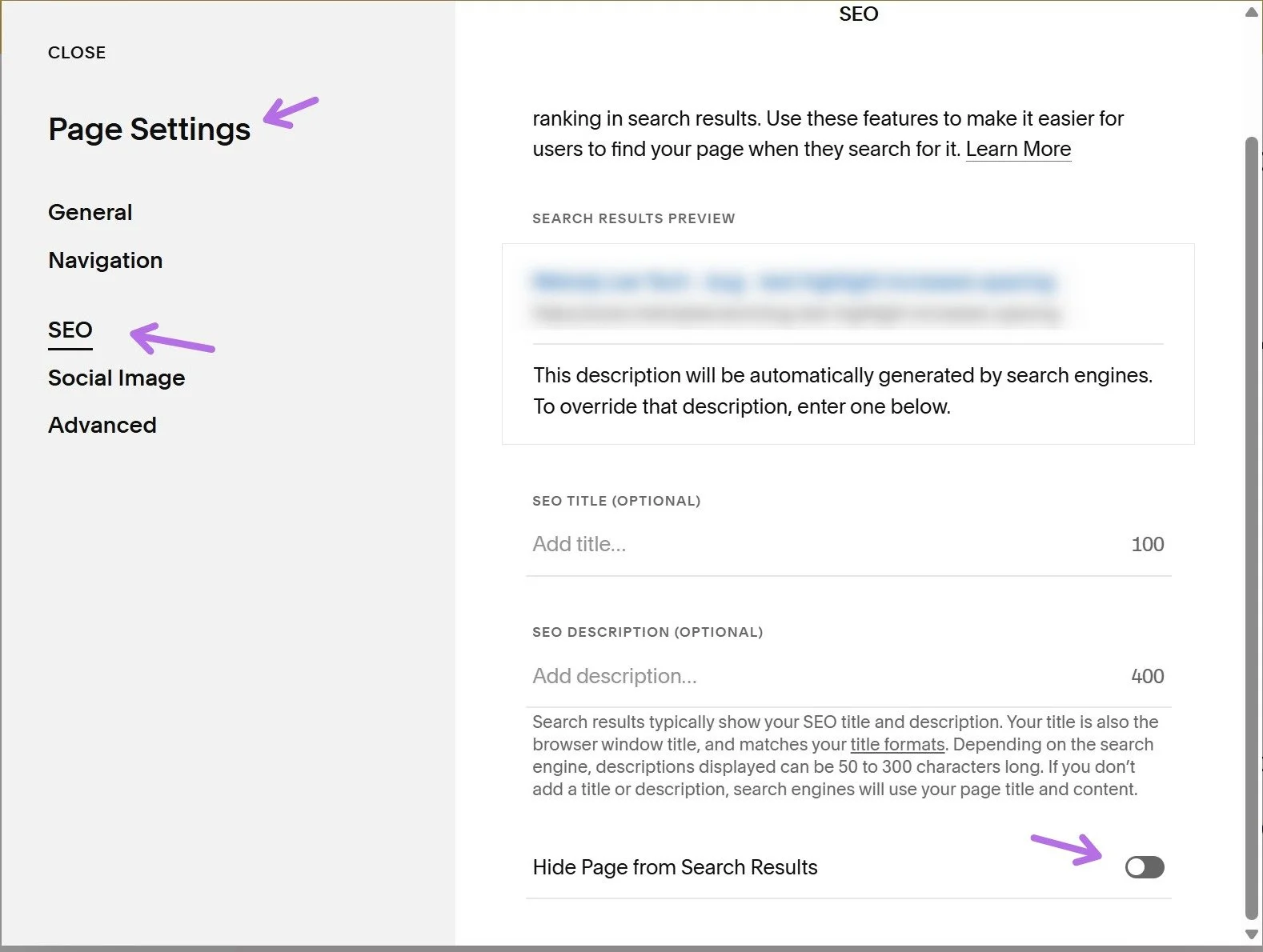
Go to Page Settings (cog wheel)
Click the SEO tab
Scroll to the bottom to find “Hide Page from Search Results”
Make sure it’s toggled off
Once the page is indexable, Google can crawl it and include it in search results. You can even go one step further and manually request indexing from Google to help speed up the indexing process.
See my guide Submit an individual page to Google Search Console.
#4 - Not Enough (useful) Content:
Google favours websites that users (the people doing the searching!) find useful. The more helpful, specific, and relevant your content is, the easier it is for Google to understand, and rank, your website.
Every page should focus on a clear topic and include written content that supports that topic. If a page relies mostly on images with very little text, Google has very little context to work with.
If Google can’t tell what your page is about, it will struggle to rank it.
How to Fix It:
Avoid heavy image-based layouts with minimal text
Identify thin content pages (very little written content) and expand them with helpful, relevant information
Make sure each page targets one clear topic (e.g. Home page = introduction & positioning, Services page = detailed service explanations, About page = credibility & story)
Use clear headings (H1, H2) to structure your content
In 2026, topical clarity and search intent matter more than word count alone.
The only exception is when people are specifically searching for your business name (e.g. an art gallery). Branded searches follow slightly different rules.
#5 - The Keywords You Are Trying to Rank Are Too Competitive (search terms):
If you are a photographer, it makes sense to want to rank for the word “photographer”.
The problem? It is extremely broad. You are competing against hundreds or thousands of other photographers, directories and high-authority websites.
Broad keywords are highly competitive and not realistic for small or new websites.
Instead, search terms typically fall into three categories:
Broad (e.g. “photographer”)
Local (e.g. “photographer in London”)
Long-tail (e.g. “wedding photographer at Camden Town Hall London”)
Newer websites have a much higher chance of ranking for specific, targeted phrases.
How to Fix It:
Target long-tail phrases specific to your niche (e.g. “wedding photographer in Camden Town Hall London”)
Use local variations relevant to your service area (e.g. “brand photographer in North London”)
Optimise individual pages around one primary keyword focus
Many Squarespace sites are ranking; just not for unrealistic keywords yet.
Still not working?
Comment below or send me your question.
*Please note, in cases where I need to troubleshoot, I am unable to do so via the comments section. Please get in touch with me instead.
Did I help? You can support me by sharing my post or consider ☕buying me a coffee☕ :) Thank you, happy building.
#neverstoplearning
Need my help?
Over a decade in tech, 10+ Squarespace websites worked on in the last 12 months, 100+ website owners helped including on the Squarespace Forum.

